Retail Returns Disposition: How to Choose Between Refurbish, Resell, Harvest, and Recycle
Memory prices and tariffs keep moving the goalposts on returned electronics. How to decide, unit by unit, whether to refurbish, resell as-is, harvest, or recycle, a calculator that shows when the answer flips, and what to require from a returns processing partner.
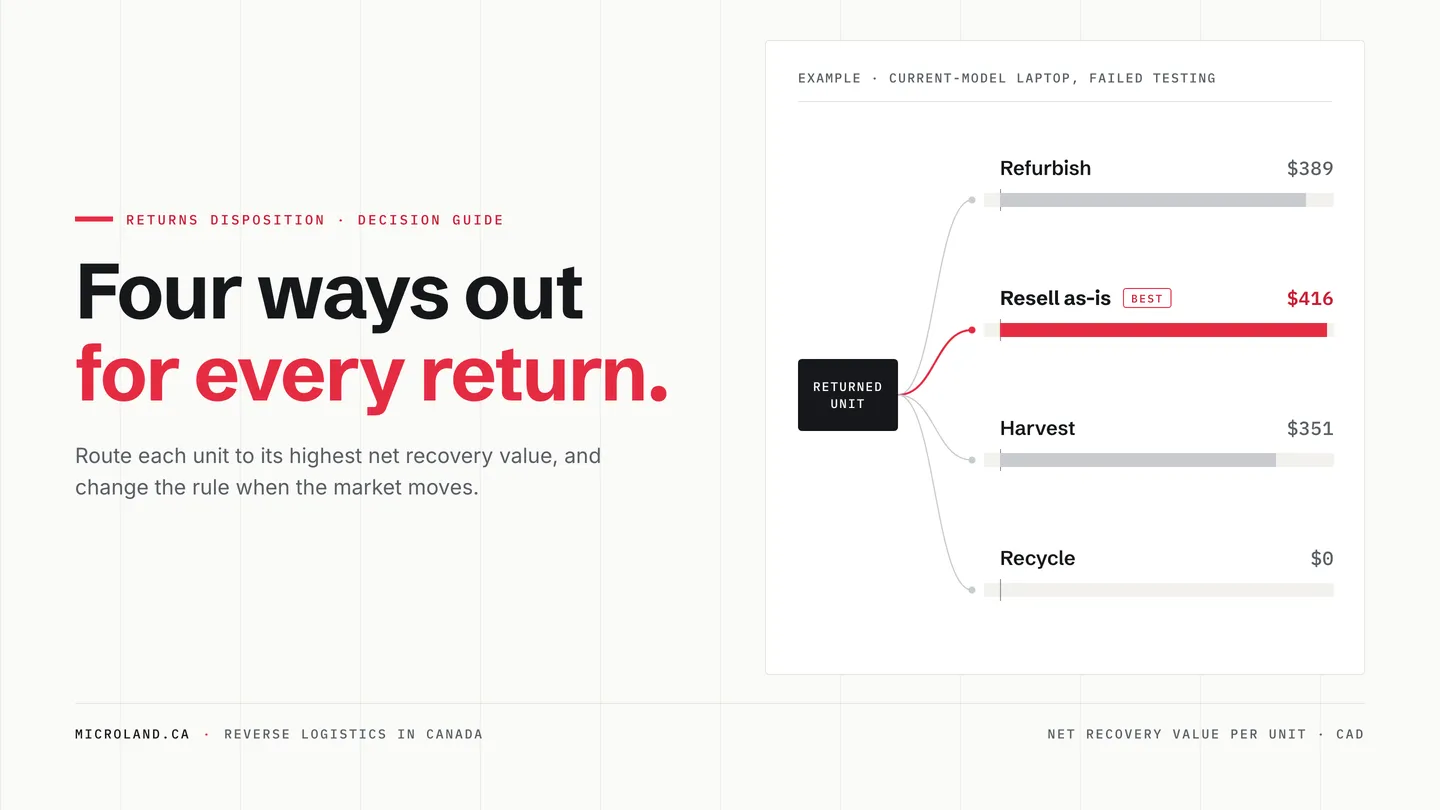
Every returned laptop, printer, or point-of-sale terminal ends up in one of four places: refurbished and resold, sold as-is, stripped for parts, or recycled. Choosing between them used to be a rule you set once a year. Not anymore.
Memory prices are the biggest reason. In September 2025, TrendForce forecast that conventional DRAM contract prices would rise 8 to 13% in the fourth quarter.1 They rose 45 to 50%,2 then another 93 to 98% in the first quarter of 2026.3 Memory now accounts for 35% of what it costs HP to build a PC, up from 15 to 18% a quarter earlier.4 And memory crashes as hard as it climbs: in 2019, DRAM contract prices were expected to fall nearly 25% in a single quarter.5
Tariffs keep rewriting the rest. In 2026 alone, the US Supreme Court struck down the IEEPA tariffs in February,6 50% duties hit a list of Canadian goods in August,7 and Canada answered on September 8 with counter-tariffs that include US-made smartphones and monitors.8
Every one of those moves changes what a refurbished unit sells for, what a repair costs, and what harvested parts are worth. A disposition rule that was right last quarter can be wrong today. So we put together a simple way to make the call unit by unit, a calculator that shows exactly how far the market has to move before the answer changes, and the one capability to demand from any partner who processes your returns.
- Store return: the customer brings the item back to the retailer.
- Receiving: the unit is scanned in by serial number.
- Triage: data-bearing devices are sanitized.
-
Test and grade. From here the unit takes one of three paths:
- Passed and unopened: back to stock. This is a side exit; the unit goes no further.
- Passed: refurbish (clean, grade, and repack), then resell as refurbished.
-
Failed: decide whether it is worth repairing.
- Worth repairing: repair, then refurbish, then resell as refurbished.
- Not worth repairing: resell as-is, harvest parts, or recycle.
- The four destinations are resell refurbished, resell as-is, harvest parts, and recycle.
The four paths
- Refurbish and resell. Test, repair if needed, restore, grade, repackage, and sell as refurbished. Usually the highest recovery, and the slowest.
- Resell as-is. Sell the unit in its current condition to an as-is buyer or liquidator. Fast and low-touch, at a steep discount.
- Harvest. Pull the parts your repair bench or parts channel actually needs. Worth only as much as the demand for those parts.
- Recycle. Material recovery after data sanitization. The floor, not the default.
How to decide
Price every path the same way, per unit: net recovery value, meaning what the path brings back, minus what it costs, adjusted for the chance it works and the time it takes. The highest number wins.
For most returns, the decision comes down to one question: when a unit fails testing, is it worth repairing? The repair ceiling answers it.
Repair ceiling = repair success rate × (net refurbished sale − best value without a repair)
The net refurbished sale is the refurbished price after selling costs, refurbishing costs, and the value lost while the unit waits to sell. The value without a repair is what the unit brings back untouched: whichever of as-is resale, harvesting, or recycling pays most. Repairing only earns the difference between the two, which is why an expensive repair on a unit that already sells well as-is rarely pays.
Plot those two numbers against each other and the paths divide into territories. The map below does it for a unit that resells refurbished at 70% of the new price and as-is at 30%: find your repair quote across the bottom, what the unit’s parts are worth up the side, and read off the winner. The left-hand boundary is the repair ceiling, and it bends once the parts are worth more than the whole unit sold as-is.
Which path wins, by repair cost and parts value
For a unit that resells refurbished at 70% of the new price and as-is at 30%. Find your repair quote across the bottom and what the unit’s parts are worth up the side.
Assumes 12% selling costs, 85% repair success, 21 days to sell at 4% value loss a month, and refurbishing at 3% of the new price. Recycling wins only when every other path is worth less than nothing, which never happens at a 30% as-is price.
Show as a table
| Parts worth harvesting | Repair cost | ||||
|---|---|---|---|---|---|
| 10% of new | 20% of new | 30% of new | 40% of new | 50% of new | |
| 0% of new | Refurbish | Refurbish | Resell as-is | Resell as-is | Resell as-is |
| 15% of new | Refurbish | Refurbish | Resell as-is | Resell as-is | Resell as-is |
| 30% of new | Refurbish | Refurbish | Resell as-is | Resell as-is | Resell as-is |
| 45% of new | Refurbish | Harvest | Harvest | Harvest | Harvest |
| 60% of new | Harvest | Harvest | Harvest | Harvest | Harvest |
Try it with your numbers
The calculator opens with a current-model laptop that came back as a return and failed testing. Fixing it would cost 25% of the new price, just above its 23% repair ceiling, so selling it as-is wins today. Push memory prices up 32% and harvesting it for parts wins. Drop them 27%, or add 22 points of tariffs, and repairing and refurbishing it wins.
Results
Best path today
Resell as-is
$416 net recovery per unit
$27 ahead of Refurbish
All four paths
- Refurbish , best path $389
- Resell as-is , best path $416
- Harvest , best path $351
- Recycle , best path $0
Stress test: memory prices and tariffs
Move the market and watch the answer change. Memory moves hit repair parts, harvested memory, and new-unit prices. Tariff moves hit new units and imported parts.
At your numbers, the best path changes to Harvest if memory prices rise 32%, and to Refurbish if they fall 27%. A tariff increase of 22 points changes it to Refurbish.
Cutoffs at today’s prices
- Repair ceiling: a unit that fails testing is worth repairing until the repair costs 23% of the new price ($323). This unit’s repair costs 25% ($350), so it is not worth repairing.
- Refurbished price floor: at this repair cost, refurbishing needs a selling price of at least 73% of new.
A planning estimate, not a quote. The defaults are illustrative; replace them with your own numbers.
How the calculator works
Formulas
- Refurbish = success rate × (refurbished price × (1 − selling costs) × age factor − refurbishing cost) + (1 − success rate) × best value without a repair − repair cost. A unit that passed testing has no repair cost.
- Resell as-is = as-is price × age factor
- Harvest = parts worth harvesting × age factor − teardown cost
- Recycle = material value − processing fees
- Age factor = 1 − monthly value loss × days waiting ÷ 30
- Memory move: the RAM and storage share of repair and harvested parts × (1 + change); new-unit prices × (1 + memory share of cost × change)
- Tariff move: new-unit prices and all parts × (1 + increase); labour is not tariffed
- Every path is compared per unit; the highest net recovery value wins.
Standard assumptions
- Repair success rate: 85% for units that need a repair. A failed repair falls back to the best path that needs no repair.
- Selling costs on refurbished sales: 12% of the sale price.
- Refurbishing (cosmetic work, test, grade, packaging): 3% of the new price. Teardown for harvesting: 2.5% of the new price.
- Days to sell: 21 refurbished, 7 as-is. Harvested parts wait 60 days before use.
- Value lost while waiting: 4% a month.
- Recycling breaks even after processing fees.
- 33% of a repair's cost is labour; the rest is parts.
- Memory and storage are 20% of a new unit's cost, so memory price moves pass into new-unit prices at that share.
What to require from a returns processing partner
The calculator makes one thing plain: the right disposition for a model can change in a week. So the most important question to ask a returns processing partner isn’t what they charge per unit. It’s how fast your rules reach their floor.
When disposition logic lives in a statement of work, changing a repair ceiling means an email, a meeting, a pricing review, an amendment, and a go-live date weeks away. Every unit that reaches triage in the meantime follows the old rule, and a unit that has already been harvested or liquidated can’t be brought back.
Hold any partner to five standards:
- You set the rules yourself, by model or by category. Direct control over repair ceilings, price floors, and which paths each model can take, ideally written as a share of the current new price so they adjust when prices move. Not a request to an account manager.
- Changes go live immediately. The next unit that reaches triage follows the new rule. No change order, no statement-of-work amendment, no meeting.
- Every unit gets a recommendation, and you make the call. Decision support on each unit, with your team free to accept or override it.
- Every decision is recorded by serial. Visible to you in real time and available to your own systems, so you can see whether a rule change paid off.
- Every path runs under one roof. If refurbishing, harvesting, and recycling sit with different vendors, a rule change waits on all of them.
A simple test for any shortlist: ask what happens, and how long it takes, if you need to raise a repair ceiling tomorrow morning.
This is how the Microland customer portal works. Partners set disposition criteria by model or by category, and a change is live in our operations immediately: the next unit at triage follows it. Every unit gets an AI-assisted disposition recommendation, and you make the final call. Every disposition is recorded by serial, in the portal and through our REST API, and our in-house development team tailors the portal to each partner’s program. Screening, board-level repair, refurbishment, resale through Skadi Electronics, parts harvesting, and IT asset disposition all run under one roof in Canada, so a rule change never waits on a second vendor.
Illustrative screen from the Microland customer portal: the disposition rules page for a returns program, with rules set by category or by model, and the By model view open.
- The category rule for current-model laptops is live: a repair ceiling of 23% of the new price, harvest above 35% parts value, and all four paths allowed: refurbish, resell as-is, harvest, and recycle.
- Model LT-14 G3 uses the category rule.
- Model LT-16 P2 has its own rule: a repair ceiling of 20% of the current new price, tighter than the category's 23%, and reselling as-is turned off for brand protection.
- The partner publishes the change and it is live at once. The confirmation reads: live now, the next unit at triage follows this rule. Published by you at 9:14 AM.
- Recent units are recorded by serial, in the portal and through the API, each with the AI recommendation and the partner's decision. SN 4F7K-20931, model LT-16 P2: recommended Harvest, decision Approved. SN 9C2M-11408, model LT-14 G3: recommended Resell as-is, decision Refurbish, overriding the recommendation. SN 7B3D-05562, model LT-16 P2: recommended Refurbish, decision Approved.
Illustrative mockup. Partners set rules by model or by category, and a published change applies to the next unit at triage.
If you run a return stream in Canada, talk to us about a returns processing and reverse logistics program.
Footnotes
-
TrendForce, press release, September 24, 2025. trendforce.com ↩
-
TrendForce, press release, February 26, 2026. trendforce.com ↩
-
TrendForce, press release, June 1, 2026. trendforce.com ↩
-
The Register, HP Inc. first-quarter 2026 results coverage, February 25, 2026. theregister.com ↩
-
TrendForce, press release, May 28, 2019. trendforce.com ↩
-
Troutman Pepper Locke, client alert on the IEEPA ruling, February 24, 2026. troutman.com ↩
-
Davis Wright Tremaine, advisory on Section 338 tariffs on Canadian goods, August 2026. dwt.com ↩
-
Blakes, bulletin on Canada’s counter-tariffs effective September 8, 2026. blakes.com ↩
Frequently asked questions
What is returns disposition?
Returns disposition is the decision about where a returned product goes next. For retail returns of electronics there are four paths: refurbish and resell it, resell it as-is, harvest it for parts, or recycle it. The best path for a given unit is the one with the highest net recovery value: what the path brings back, minus what it costs, adjusted for the chance it works and the time it takes.
Should a returned unit that fails testing be repaired or recycled?
Repair it if the repair costs less than the repair ceiling: the repair success rate multiplied by the difference between the net refurbished sale and the value of the best path that needs no repair. Above the ceiling, send it to whichever of as-is resale, parts harvesting, or recycling brings back the most. As a reference point, for a current-model laptop that resells refurbished at 70% of the new price and as-is at 30%, with 12% selling costs and an 85% repair success rate, repairs pay until they cost about 23% of the new price.
What should you look for in a returns processing partner?
Beyond the price per unit, look at how quickly your disposition rules reach the processing floor. A strong returns processing partner lets you set disposition criteria yourself, by model or by category; puts a rule change live immediately, without a statement-of-work amendment or a round of meetings; gives every unit a disposition recommendation while leaving the final call to you; records every decision by serial in a portal and an API; and runs refurbishment, parts harvesting, resale, and recycling under one roof, so a rule change never waits on another vendor. Microland's customer portal is built around these capabilities.
How do memory prices affect returns disposition decisions?
Memory and storage prices move three inputs at once: the cost of memory and storage parts needed for repairs, the value of memory and storage recovered by harvesting, and the price of new devices, which sets refurbished and as-is resale prices. When memory prices spike, units that need memory parts to be fixed shift away from refurbishment and units with valuable recoverable memory shift toward harvesting. When prices fall, the shift reverses.
How do tariffs affect returns disposition in Canada?
Tariffs passed through to new-device prices lift refurbished and as-is resale prices with them. Tariffs on imported parts raise repair costs and increase the value of parts harvested domestically. Any flow that crosses a border, such as a repair leg in the United States or a refurbished sales channel in another country, adds duty exposure, customs entries, and time. Tariff rules changed repeatedly in 2026, so treat them as a variable, not a constant.
How often should disposition rules be updated?
Whenever an input moves enough to change a decision: a memory or storage price move of more than about 15% in a quarter, any tariff change on products or parts in the program, or a shift in refurbished sell-through. Rules written as a percentage of the current new price need fewer updates than fixed dollar thresholds, and rules the program owner can change directly, rather than through contract amendments, can change the same day.